V2 - Overview
Currently the hosted payment page supports three methods of implementation:
- Standard Hosted Page (i.e. redirection from the merchants website to the payment page)
- iframe embedded page
- Accounting platform payment page (for example Xero or Saasu)
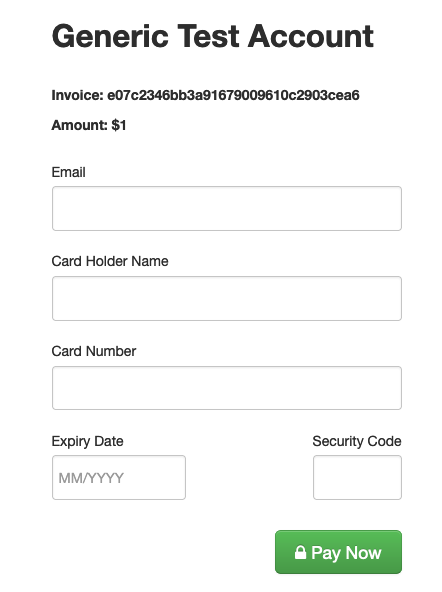
The V2 UI looks like this, but can be restyled by using the css parameter documented below:
Usage
The data sent between the merchant and Fat Zebra, and from Fat Zebra to the merchant is sent in the request URL - to ensure that this has not been tampered with the payload includes a verification value, which is a signed-hash based on the payload values, using a shared secret between the merchant and Fat Zebra. This process has been closely modeled on the Fat Zebra Direct Post method - it is recommend you review this documentation for further details which may not be covered here.
URLs
There are two different URLs for the PayNow service - one for the Live environment and one for the Sandbox environment:
| Environment | BASE URL |
|---|---|
| Sandbox | https://paynow.pmnts-sandbox.io/v2 |
| Live | https://paynow.pmnts.io/v2 |
Request
In order to direct the customer to the hosted payment page the merchants website should prepare the following URL and either use this as the redirect destination, or as the IFRAME source:
https://paynow.pmnts.io/v2/[username]/[reference]/[currency]/[amount]/[hash]
URL Parameters
The following parameters are required and are used to build the URL which the user should be redirected to (or as the source for the IFRAME):
| Name | Type | Description |
|---|---|---|
| amount | number | The amount of the transaction, as a decimal value. For currencies which do not make use of the decimal/cent value this should be omitted as 00 (e.g. 300.00 for ¥300) |
| hash | string | The hash is a MD5 hexdigest of a string compiled from the request parameters. See below (Verification Value Calculation) for more details. |
| reference | string | The invoice number or order reference |
| currency | string (3 characters) | The ISO-4217 3-letter currency code for the transaction |
| username | string | The merchants Fat Zebra username |
Options
Provide any of the following as query parameters to specify display options - these are optional parameters:
| Name | Type | Description | Default |
|---|---|---|---|
| iframe | boolean | Indicates whether to show the stripped-down iframe layout or not | false |
| show_email | boolean | Indicates whether to show and require the email field or not | true |
| show_extras | boolean | Indicates whether to display the invoice number and the amount to the customer | true |
| return_path | string |
The return URL for the transaction success - if this is omitted the result will be displayed on screen to the customer
|
empty |
| tokenize_only | boolean | If this is set the card will not be charged, and will only be tokenized for future use | false |
| auth | boolean | If this is set the card being tokenized or the transaction processed will have an auth for the amount specified in the request performed. This can be used to verify the card details are valid before storing. |
false |
| recurring | boolean | *(Apple Pay only)* If this is set, the payment will have an ecm of 32 (Internet Order - Recurring). See Recurring & Other Transaction Types for more details. |
false |
| button_text | string | Specifies the text to be displayed for the submit button (e.g. Pay Now or Submit) | Pay Now |
| visacheckout | boolean | Indicates whether to show the Visa Checkout button | true |
| applepay | boolean | Indicates whether to show the Apple Pay button (if the user's device supports Apple Pay) | true |
| googlepay | boolean | Indicates whether to show the Google Pay button (if the user's device supports Google Pay) | true |
| return_target | string | When used in iframe mode (iframe=true) specifies where the target for the form post (e.g. post back to _parent, _self or speficied) | empty |
| postmessage | boolean | When used in iframe mode (iframe=true) specifies that the response should be sent using postMessage instead of redirecting | false |
| css | string | HTTPS URL for external CSS - this must be a valid HTTPS URL, and serve up a valid CSS file. Depends on css_signature | empty |
| css_signature | string | HMAC-MD5 of the css URL with the shared secret to sign the request. | empty |
| logo_url | string | HTTPS URL for the merchant logo. This must be a valid HTTPS URL and serve up a valid image file. | empty |
| hide_button | boolean | Hides the button from the checkout form for when the checkout should be triggered by postMessage. Note this option is dependent on the v2 layout. | false |
| layout | string | Specifies the layout for the hosted payment page (also aliased as l - e.g. l=v2) | v1 |
| cards | string, comma separated |
Specifies the whitelist or blacklist of accepted cards. If the string is prefixed with an exclamation mark (!) the cards listed will not be permitted.\
Possible values are: AMEX, JCB, VISA, MasterCard, Diners
Examples
!AMEX,JCB - disabled AMEX and JCB
VISA,AMEX - enabled only VISA and AMEX
|
empty |
| surcharge | boolean |
Specifies if a surcharge will be applied. Surcharge rates are set in the Surcharging section of the Merchant Dashboard.
|
false |
| hide_card_holder | boolean | Specifies if the card holder name field should be hidden | false |
Note on external CSS: When external CSS specified in the options the hosted payment page a number of verification and sanitisation steps are taken before rendering the CSS in the page, including:
- Verifying the URL specified is served over HTTPS and is in-fact a CSS file
- Verifying that the css_signature matches the URL
- Scrubbing any potentially dangerous CSS statements from the file
After successful verification and sanitising , the filtered CSS is cached by the Hosted Payment Page for 5 minutes. If the cache needs to be updated, the following options are available:
- Change the URL and update the signature to reflect - the CSS cache uses the filename and merchant ID as the cache key, so changing this will force the cache to be updated
Verification Value Calculation
There are two points of verification for requests - once when the request is received by Fat Zebra (when the hosted page is rendered to the user), and once when the response is returned to the merchant - it is important that the response is verified by the merchant to ensure that the response has not been tampered with by malicious users.
Request Verification (Redirect to Fat Zebra)
The request received by Fat Zebra will be verified with the following steps:
- The reference, currency, amount, and if present, hide_card_holder and return_path will be concatenated into a string, joined by colons:
https://paynow.pmnts.io/v2/samsbooks/INV1121/AUD/100.25/xxxxxxxxxxx&hide_card_holder=true -> "INV1121:100.25:AUD:true"If hide_card_holderand/or return_path is not included, they will be omitted:
https://paynow.pmnts.io/v2/samsbooks/INV1121/AUD/100.25/xxxxxxxxxxx&hide_card_holder=true -> "INV1121:100.25:AUD"- The value of this string will then be hashed with a HMAC-MD5, using the shared-secret known by Fat Zebra and the merchant (please contact Fat Zebra Support if you are unsure of where to find this shared secret).
shared_secret = "<<sharedSecret>>"
verification = hmac_md5(shared_secret, "INV1121:100.25:AUD:true")
Response Verification (Purchases)
For purchases the response verification will consist of the response code, success indicator, amount, currency, transaction ID and the card token:
https://www.samsbooks.com/payment/callback?r=1&successful=true&amount=10025¤cy=AUD&id=001-P-ABCDG1124&token=abcd1234&v=xxxxx....... -> "1:true:10025:AUD:001-P-ABCDG1123:abcd1234"
shared_secret = "<<sharedSecret>>"
verification = hmac_md5(shared_secret, "1:true:10025:AUD:001-P-ABCDG1123:abcd1234")
# v == verification should be trueThe response for purchases will also include the following:
| Name | Type | Description |
|---|---|---|
| message | string | Any messages relating to the transaction |
| amount | integer | The amount, as an integer |
| reference | string | The transaction reference |
| id | string | The Fat Zebra transaction ID |
| currency | string | The ISO-4217 3-letter currency code for the transaction |
| card_number | string | The masked credit card number (e.g. 512345XXXXXXXX2346) |
| card_holder | string | The card holders name |
| card_expiry | date (mm/yyyy) | The card expiry date |
| card_type | string | The card type of the credit card used. Possible values are: VISA, MasterCard, AMEX, JCB, Diners, Discover, China UnionPay, Unknown |
| successful | boolean | Indicator of transaction success |
Response Verification (Tokenization)
For tokenization the response verification will consist of the response code, and the card token:
https://www.samsbooks.com/payment/callback?r=1&token=abcd1234&v=xxxxxxxxx........ -> "1:abcd1234"
shared_secret = "<<sharedSecret>>"
verification = hmac_md5(shared_secret, "1:abcd1234")
# v == verification should be true
The response for tokenization will also include the following:
| Name | Type | Description |
|---|---|---|
| card_number | string | The masked credit card number (e.g. 512345XXXXXXXX2346) |
| card_holder | string | The card holders name |
| card_expiry | date (mm/yyyy) | The card expiry date |
| token | string | The token representing the card in Fat Zebra systems |
Response Codes
The following response codes are used when a redirect URL is provided:
| Code | Description |
|---|---|
| 1 | Successful |
| 2 | Declined - examine the message parameter for possible explanations |
| 94 | Cancelled - the merchant clicked the Cancel button on the payment or checkout form |
| 95 | Merchant Not Found - possible incorrect username |
| 96 | Reference not unique |
| 97 | Validation error - check the errors[] parameters for error messages |
| 99 | Invalid Verification - the verification value does not match the parameters supplied |
| 999 | Gateway error - an unknown error has occurred and the merchant should investigate with Fat Zebra Support |
IFRAME and postMessage Support
The Hosted Payment Page supports being embedded in an IFRAME and communicating back to the parent window via the postMessage function. In order to support this the following needs to be done:
- The postmessage=true parameter needs to be added to the URL
- The following code should be added to handle the messages from the IFRAME:
window.paymentHost = "https://paynow.pmnts-sandbox.io";

var messageListener = function(event) {
  if (event.origin !== window.paymentHost) {
  return;
  }

  // Older browsers will have a query-string style data payload
  // Whereas newer browsers will have an object
  var payload = event.data;
  if (typeof event.data == 'string') {
  if (/\[object/i.test(event.data)) {
    alert("Sorry, it looks like there has been a problem communicating with your browser..."); // Raised if the serialization failed
  }
  // Deserialize into an object
  var pairs = payload.split("&");
  payload = {};
  for (var i = 0; i < pairs.length; i++) {
    var element = pairs[i];
    var kv = element.split("=");
    payload[kv[0]] = kv[1];
  }
  }
  if ('data' in payload) {
  var payload = payload.data;
  }
  switch (payload.message) {
  case "transaction.complete":
    // Handle the transaction complete message.
    // Payload will be in e.data.data (eg. payload.data.r == 1)
    return true;
  case "transaction.processing":
    // Handle the processing of the transaction - implementation optional.
    return true;
  case "transaction.cancelled":
    // Handle the transaction being cancelled (i.e. show message, re-display the window etc).
    return true;
  }
};

if (window.addEventListener) { window.addEventListener("message", messageListener); }
else { window.attachEvent("onmessage", messageListener); }
Testing
Standard Fat Zebra test procedures apply for the Hosted Payment Page.
For a successful transaction you should choose the MasterCard ending in 0014. If this card is not present (as this is a shared account) it can be re-added with the following details: